You're mid-set on bench press, phone propped on the rack, and you tap to log your reps. Nothing happens. The loading spinner just keeps spinning. The gym's Wi-Fi is down again, or maybe there never was Wi-Fi in your garage gym. Your workout data is stuck in limbo until you get back online.
This is the reality for millions of lifters who depend on cloud-based workout apps. And it's getting worse, not better. More apps are moving to mandatory account creation, server-side processing, and cloud-first architectures that treat offline use as an afterthought. Meanwhile, the situations where you need offline access are everywhere: commercial gyms with terrible Wi-Fi, basement and garage home gyms, hotel fitness centers while traveling, outdoor workout parks, and military bases or remote locations.
Beyond connectivity, there's a growing group of people who simply don't want to create yet another account. They don't want their workout data sitting on someone else's server. They don't want to hand over their email address just to log a set of squats.
If any of that resonates, this guide is for you. We tested five popular workout tracker apps specifically for their offline capabilities, account requirements, and data privacy practices.
In This Guide
- What "Offline" Really Means
- The Best Offline Workout Apps, Ranked
- Offline Comparison Table
- Why Privacy Matters in Workout Apps
- How to Check If Your Workout App Works Offline
- Final Verdict
What "Offline" Really Means
Before we rank apps, let's define what "works offline" actually means, because companies use the term loosely.
True offline means the app works with absolutely zero internet connection from the moment you install it. No account creation screen. No initial sync. No "sign in to continue" gate. You open the app, and you can start tracking a workout immediately — on airplane mode, in a bunker, wherever.
Offline-capable is different. Many apps let you log workouts without an active connection, but they required internet to set up in the first place. You had to create an account, verify an email, maybe do an initial sync of exercise databases or workout plans. Once that's done, the core logging works offline and syncs when you reconnect. This is better than nothing, but it's not truly offline.
Cloud-dependent apps break without internet. Features like AI workout generation, social feeds, or exercise video libraries simply stop working. Some won't even let you start a workout if they can't reach their server.
The distinction matters. If you're buying a phone for your teenager who only has Wi-Fi at home, or you're deploying overseas, or you simply refuse to create accounts for every app you use — "offline-capable" isn't the same as "offline-first."
With that framework in mind, here's how the five most popular gym trackers actually perform.
The Best Offline Workout Apps, Ranked
1. IronStreak — Best Overall Offline Experience
Platform: iOS | Price: Free / Pro $3.99/mo or $29.99/yr
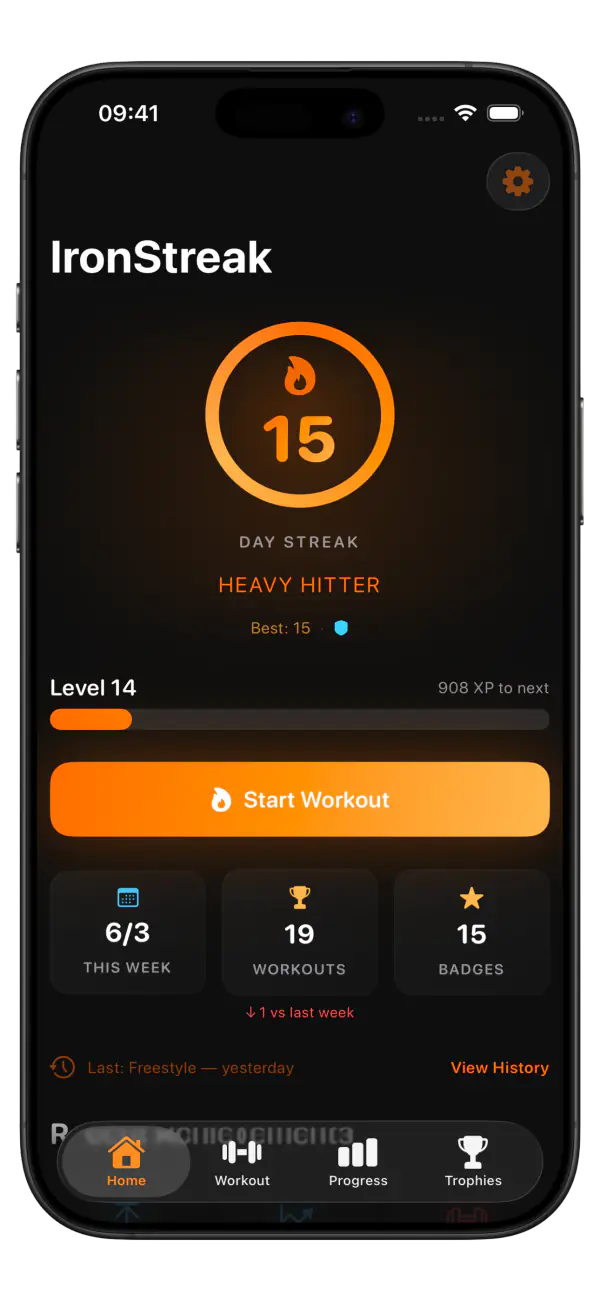
IronStreak is the only workout tracker we tested that is truly offline-first. There is no account creation screen. There is no login. There is no email field anywhere in the app. You download it, open it, complete a quick onboarding flow (which runs entirely on-device), and you're tracking workouts.
How Offline Works
All data is stored locally on your device using Apple's SwiftData framework. Your workouts, routines, personal records, streaks, XP, achievements, and settings — everything lives on your iPhone and nowhere else. There is no server component. IronStreak doesn't have a user database because there are no user accounts.
This means every feature works offline, all the time:
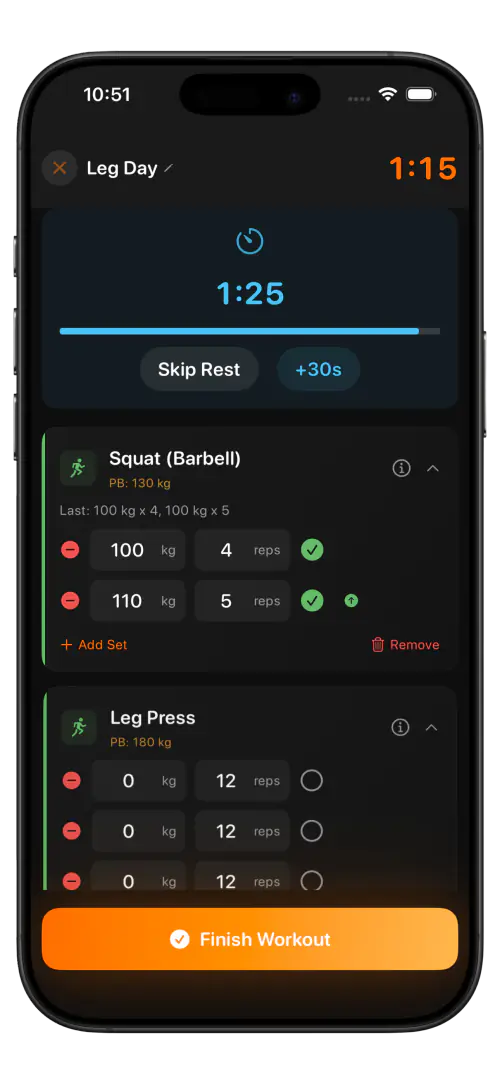
- Full workout tracking with 91 built-in exercises across six muscle groups, plus custom exercises
- Routine management with auto-generated splits based on your experience and weekly target
- Pre-filled sets from your last session with comparison arrows for progressive overload
- Rest timer with skip and extend controls
- Streaks, XP, and 50 achievements across four trophy tiers — all calculated on-device
- Dynamic Island and Live Activity showing your current exercise, set count, and rest countdown
- Progress charts with estimated 1RM over time and a full PR board
- Exercise info sheets with form cues, common mistakes, and muscle groups worked
The only feature that requires internet is the "Watch Form Guide" button on exercise info sheets, which opens a YouTube search. Everything else is self-contained.
Privacy
IronStreak's privacy policy is unusually short because there's almost nothing to disclose. The app collects zero user data. No analytics. No tracking. No crash reporting that includes personal information. Your workout history exists on your device and nowhere else.
The tradeoff is that if you lose or break your phone without a backup, your data is gone. CloudKit sync is planned for a future update, but it will be opt-in — the default will remain local-only.
What You Get
Beyond the offline story, IronStreak is a genuinely capable workout tracker. The gamification system (streaks, XP, levels, achievements) is deeper than anything else on the market — think Duolingo's consistency mechanics applied to the gym. The exercise library covers all major compound and isolation movements with three tracking types (weight+reps, bodyweight+reps, and time-based). And the pricing is among the most affordable at $3.99/mo or $29.99/yr, with a generous free tier.
2. Strong — Offline-Capable, Account Required
Platform: iOS, Android, Apple Watch | Price: Free (limited) / Pro $4.99/mo or $29.99/yr
For a detailed comparison, see IronStreak vs Strong.
Strong is one of the most popular gym trackers and for good reason — the logging experience is clean, fast, and reliable. But its offline story has an asterisk.
How Offline Works
Strong requires you to create an account (email or Apple ID) when you first open the app. Once your account is set up and your routines are synced, the core workout logging works offline. Your sets, reps, and weights are saved locally and sync to Strong's servers when you reconnect.
This means Strong is offline-capable but not offline-first. You need internet for the initial setup. If you're on a plane and download Strong for the first time, you can't use it until you land and create an account.
Data Storage
Your workout data is stored on Strong's servers. This enables cross-device sync (a genuine advantage if you use both an iPhone and an Apple Watch), but it means your training history lives on a third-party server. Strong's privacy policy covers their data practices, but the fundamental reality is that your data leaves your device.
Offline Limitations
- Account creation requires internet
- Free tier is limited to 3 routines (upgrading requires internet)
- Sync features obviously need a connection
- Apple Watch app syncs with the phone, which syncs with the cloud
Bottom Line
Strong works offline for day-to-day logging once you've set it up. The Apple Watch support is a genuine advantage for wrist-based logging. But it's not a "no account, no internet" solution.
3. Hevy — Social First, Offline Second
Platform: iOS, Android | Price: Free / Pro $8.99/mo or $49.99/yr
See our full breakdown: IronStreak vs Hevy.
Hevy is built around social features — sharing workouts, following friends, giving likes. That social-first design means it's inherently more dependent on internet connectivity than a pure logging tool.
How Offline Works
Hevy requires account creation (email or Google sign-in) to use the app at all. Once signed in, the core workout logging functions offline. You can start a workout, log sets, and complete the session without a connection. The data saves locally and syncs when you're back online.
However, a significant portion of Hevy's value proposition — the social feed, workout sharing, following friends, comments, and likes — requires an active internet connection. If Hevy's social features are why you chose it, offline mode gives you only half the app.
Data Storage
All data is stored in Hevy's cloud. Account creation is mandatory. Your workout history, personal records, routines, and social connections are all server-side. This is necessary for the social features to work, but it means your gym data is permanently on their servers even if you delete the app.
Offline Limitations
- Account creation requires internet (email or Google)
- Social feed, sharing, and community features are unavailable offline
- Exercise GIF demonstrations may not load offline unless cached
- Template/routine syncing needs a connection
- Free tier shows ads (which don't load offline, a silver lining)
Bottom Line
Hevy works for offline logging in a pinch, but it's clearly designed as an online-first social platform. If you chose Hevy for the community, losing your connection means losing the feature you're paying for.
4. JEFIT — Offline After Initial Sync
Platform: iOS, Android, Web | Price: Free / Pro $6.99/mo or $39.99/yr
JEFIT has been around since 2010, and its massive exercise database (over 1,400 exercises) is its primary draw. The offline experience is decent but requires setup.
How Offline Works
JEFIT requires account creation and an initial sync to download the exercise database and any workout plans you want to follow. After that initial sync, the core logging functionality works offline. Exercises, descriptions, and images are cached locally.
The community workout plans — one of JEFIT's unique features — need to be downloaded while online. Once cached, you can follow them offline. But browsing for new plans or accessing the community forums requires a connection.
Data Storage
Account-based, cloud-stored. JEFIT also has a web dashboard where you can view your data in a browser, which inherently means your data lives on their servers.
Offline Limitations
- Account creation and initial database sync require internet
- Community plans must be downloaded in advance
- Web dashboard obviously needs internet
- Ad-supported free tier (ads don't load offline)
- Exercise images and descriptions need initial caching
Bottom Line
JEFIT's offline mode is serviceable if you plan ahead and sync everything before going off-grid. The exercise database depth is unmatched. But it's not something you can pick up and use without internet on day one.
5. Fitbod — AI Needs the Cloud
Platform: iOS, Android, Apple Watch | Price: 3 free workouts, then $12.99/mo or $79.99/yr
Read our detailed comparison: IronStreak vs Fitbod.
Fitbod's core value proposition is AI-generated workouts based on your training history and muscle recovery status. That AI engine runs on Fitbod's servers, which creates a fundamental dependency on internet connectivity.
How Offline Works
Fitbod requires an account and needs internet to generate your workouts. However, once a workout is generated and loaded on your phone, you can complete it offline. The sets, reps, and weights you log are saved locally and sync when you reconnect.
The problem is the generation step. If you open Fitbod in airplane mode expecting a fresh workout, you may find nothing ready — or you'll see a cached version of a previous workout. The app can cache upcoming workouts, but this requires forethought and a recent connection.
Data Storage
Account required. Cloud-based. Your entire training history feeds the AI model, so the data must live on their servers for the product to function as designed.
Offline Limitations
- Account creation requires internet
- AI workout generation requires internet
- Muscle recovery calculations happen server-side
- Exercise video demonstrations need a connection
- Most expensive option at $12.99/mo with only 3 free workouts
Bottom Line
Fitbod is the least offline-friendly app on this list. Its best feature — AI workout generation — simply doesn't work without a connection. You can cache workouts for offline use, but you're working around the app's design rather than with it.
Offline Comparison Table
| Feature | IronStreak | Strong | Hevy | JEFIT | Fitbod |
|---|---|---|---|---|---|
| Account Required | No | Yes | Yes | Yes | Yes |
| Works Offline (Day 1) | Yes | No (setup needed) | No (setup needed) | No (sync needed) | No (sync needed) |
| Works Offline (After Setup) | Yes | Yes (core logging) | Yes (core logging) | Yes (cached data) | Partial (cached only) |
| Data Storage | On-device only | Cloud (Strong servers) | Cloud (Hevy servers) | Cloud (JEFIT servers) | Cloud (Fitbod servers) |
| Privacy Policy | Zero data collection | Standard cloud | Standard cloud + social | Standard cloud | Standard cloud + AI |
| Features Lost Offline | YouTube links only | Sync, account mgmt | Social feed, sharing, GIFs | Community, web dashboard | AI generation, videos |
| Price (Monthly) | Free / $3.99 | Free (limited) / $4.99 | Free / $8.99 | Free / $6.99 | $12.99 |
| Platforms | iOS | iOS, Android, Watch | iOS, Android | iOS, Android, Web | iOS, Android, Watch |
Why Privacy Matters in Workout Apps
Some people hear "workout data privacy" and think it's paranoia. It's not. Consider what a detailed workout history reveals about you:
- Body weight and strength levels — your body weight entries and lift numbers paint a detailed picture of your physical capabilities
- Injury patterns — suddenly stopping certain exercises or dropping weight significantly signals injuries, which has insurance and employment implications
- Gym schedule — your workout timestamps tell anyone with access exactly when you're away from home, for how long, and how predictable your routine is
- Location patterns — apps that track which gym you're at combine workout data with precise location history
- Health conditions — exercise modifications and patterns can reveal health information you haven't chosen to share
This isn't theoretical. Fitness app data has been used to reveal military base locations, subpoenaed in legal proceedings, and sold to data brokers. When your workout data lives on someone else's server, you've lost control over who sees it and how it's used.
IronStreak's approach — storing everything locally with zero data collection — eliminates this concern entirely. There's no server to breach, no database to subpoena, and no data broker to sell to. Your workout history exists on your device and nowhere else.
That said, local-only storage has a tradeoff: no automatic cloud backup. If you lose your phone, you lose your data (unless you have an iCloud device backup). For most people, the privacy benefit far outweighs this risk, especially since iCloud device backups handle it transparently.
How to Check If Your Workout App Works Offline
Don't take an app's marketing at face value. Here's a quick test you can run on any workout tracker to verify its offline capabilities:
- Enable airplane mode on your phone (Settings > Airplane Mode, or swipe from Control Center)
- Open the app and try to start a new workout
- Add an exercise and log at least one set with weight and reps
- Complete the workout and save it
- Close the app completely (swipe it away from the app switcher)
- Reopen the app still in airplane mode
- Check that your workout data persisted — look for it in your workout history
If any step fails, the app doesn't truly work offline. Many apps will let you log sets (step 3) but fail on persistence (step 7), losing your data when the app restarts without a connection.
We ran this exact test on all five apps. IronStreak passed every step with zero issues — including the first-time setup, since it has no account gate. Strong, Hevy, JEFIT, and Fitbod all passed steps 2-7 after initial setup, but all four failed on a fresh install because they require account creation to proceed.
Final Verdict
If you need a workout app that works offline with no account, the answer is straightforward: IronStreak is the only app on this list that requires zero internet, zero account creation, and stores zero data externally.
Every other app we tested requires you to create an account and connect to the internet at least once before you can start tracking. That's not necessarily a dealbreaker — Strong and Hevy are excellent trackers once set up, and their offline logging is reliable for daily use. But they're offline-capable, not offline-first.
Here's our recommendation by use case:
- Maximum privacy, zero accounts: IronStreak. The only true offline-first option. All data on-device, no cloud, no login.
- Offline logging with Apple Watch: Strong. Requires setup, but solid offline logging with the best wearable support.
- Offline logging with social features when online: Hevy. Good offline logging, great social features when connected.
- Largest exercise database: JEFIT. Cache the database once, then use offline with 1,400+ exercises.
- AI-generated workouts (with internet): Fitbod. Not an offline solution, but the best option if you want the app to program for you.
The gym is one of the few places left where you should be able to put your phone on airplane mode and focus. Your workout tracker should support that, not fight it. Building a gym streak is hard enough without worrying about connectivity.
Download IronStreak free on iOS — no account, no internet, no excuses.